
Cookpad recipes, homemade food
Cookpad Inc.Food & Drink
4.2118.00 Reviews
- Version
- 26.35.0.1
- Installs
- 10.00M
- Age Rating
- Everyone
Screenshots
Our Review of Cookpad recipes, homemade food
 Analysis by Appyee
I like recipe apps most when they help me solve a real kitchen problem: what can I make with what I already have, and will the instructions make sense when I’m halfway through cooking? Cookpad is built around recipes shared by home cooks, so its appeal is less about polished restaurant-style presentation and more about finding practical ideas and learning how other people make everyday food. I’d treat it as a source of inspiration and a community recipe notebook, rather than assuming every dish will be tested to the same standard.
What free access means in practice
Cookpad is a free Food & Drink app from Cookpad Inc., with in-app purchases listed from $1.49 to $4.99 per item. That makes it easy to try without paying up front, but I wouldn’t assume that every feature or experience is included at no cost. If you’re deciding whether it suits you, start with the free access and judge the recipes and community for yourself before considering any optional purchase.
The app has a 4.3 average from around 117,000 ratings and has been installed over 10 million times. Those figures suggest that it has reached a large audience, but they can’t tell me whether a particular recipe will work in my kitchen. I’d still read the method carefully, check the ingredients against what I have, and use the comments as helpful context rather than a guarantee.
Where the value comes from
For me, the strongest value is the combination of searchable home-cooking ideas and people sharing what they actually made. A conventional cookbook gives you a more curated set of recipes, while a basic search engine may return pages with long introductions or inconsistent layouts. Cookpad sits somewhere between those options: it can help me browse for a dish, then let me learn from cooks who have tried that recipe and left notes or photos.
That makes it especially useful when I’m not following a strict meal plan. I can begin with a main ingredient, look for a new way to use it, and compare a few approaches before choosing one. The trade-off is that a community collection can vary in detail and style. I wouldn’t treat every recipe as equally clear or assume that a result is tailored to my exact equipment, skill level, or dietary needs.
Small habits that make it more useful
One practical approach is to read a recipe from top to bottom before I start. I check the ingredient list, scan the steps for preparation that needs to happen early, and look at comments for useful adjustments. This avoids the familiar problem of discovering halfway through that a recipe depends on a step I hadn’t noticed.
I also find it useful to save promising dishes as I browse, then sort them into collections by occasion or meal-planning need. A collection for reliable weekday dinners is more useful to me than a long, unsorted list of bookmarks. When I try something, I can use the community discussion and Cook Snaps to compare the result with other cooks’ attempts, while remembering that different ingredients and kitchens can produce different outcomes.
Who should try it, and who may prefer something else
I’d recommend Cookpad to someone who enjoys home cooking, wants fresh ideas from other cooks, and doesn’t mind doing a little judgment work before choosing a recipe. It can be particularly helpful if you like adapting dishes, learning from comments, or sharing your own versions rather than only following a fixed cookbook.
If you need tightly standardized recipes, carefully controlled nutrition information, or a meal plan built around precise requirements, a specialist service or a trusted cookbook may be a better fit. The same goes for cooks who want every recipe to follow one consistent editorial style. Community variety is a strength when you want options, but it also means you may need to compare instructions and decide which advice makes sense for you.
A realistic use case is getting home with vegetables that need using and no firm dinner plan. I’d search for a dish that fits the ingredients, open a few promising recipes, and compare their methods before choosing one that matches the time and equipment I have. Then I’d save the winner in a weekday collection and check the comments for practical substitutions. That workflow turns browsing into a decision, rather than leaving me with dozens of ideas and no dinner.
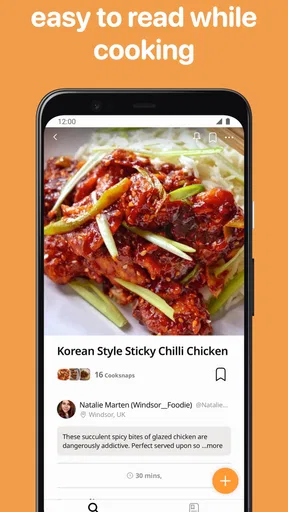
There’s also a useful difference between Cookpad and video-first cooking platforms. A video can make a technique easier to see, but it may be awkward to pause and locate a particular quantity while my hands are busy. Written steps and recipe photos can be easier to scan at the counter; in return, they may not explain a tricky motion as clearly as a demonstration. I’d use the format that fits the task, and consult another source when a technique is unfamiliar.
Discovering New Recipes
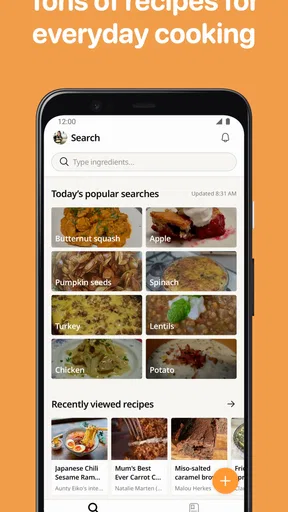
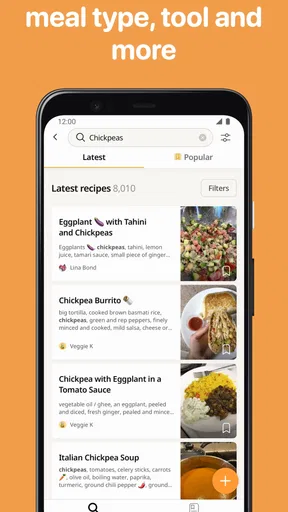
First off, let me say that the sheer variety on Cookpad is mind-blowing. I mean, whether you're hunting for a quick weeknight dinner or planning a gourmet feast, you'll find something that tickles your fancy. I was particularly impressed by how easy it is to search for recipes. You can filter by ingredients, cuisine, dietary needs, and more.
And the best part? Most of these recipes are shared by home cooks just like us, which gives it a real community vibe. It’s like having a global potluck at your fingertips. I tried out a few recipes myself and, let me tell you, they did not disappoint!
Easy-to-Follow Instructions
One thing I absolutely loved was how detailed the recipe instructions are. Each step is laid out clearly, which is perfect if you're trying something new and a bit challenging. Plus, there are often photos accompanying the steps, which is a lifesaver if you're a visual learner like me.
Another cool feature is the ability to leave comments on recipes. It’s super helpful to read other users’ tips and modifications. I found myself tweaking a couple of dishes based on these insights, and they turned out even better!
Sharing Your Creations
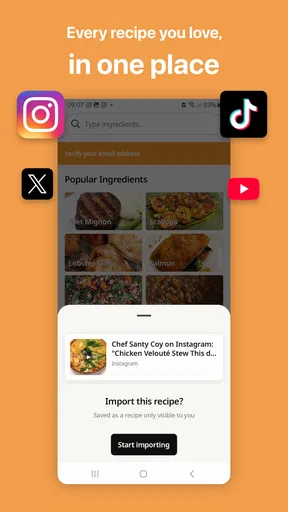
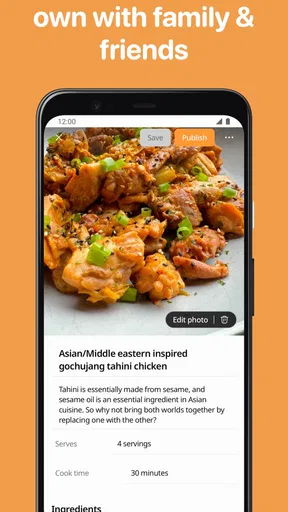
If you're proud of your culinary creations, Cookpad lets you share your recipes with the world. I uploaded my grandma’s famous lasagna recipe, and it was thrilling to see other users try it out and give feedback. It’s a fantastic way to connect with fellow food lovers and swap inspiration.
Moreover, the app encourages interaction with features like "Cook Snaps," where you can share photos of your attempts at recipes. It’s a fun way to show off your cooking skills and see how others interpreted the recipe.
User-Friendly Interface
Let's talk about the user interface for a second. Navigating through Cookpad is a breeze. The layout is intuitive, and everything is easy to find. Whether you're browsing categories or searching for something specific, it’s all just a tap away. Plus, the app’s design is aesthetically pleasing, which makes the experience enjoyable.
Also, if you’re worried about managing your favorite recipes, fear not! The app allows you to save and organize them effortlessly. You can create collections for easy access later, which is super handy when meal planning for the week.
Community and Interaction
What sets Cookpad apart from other recipe apps is its strong sense of community. You can follow other cooks, see what they’re whipping up in their kitchens, and even join cooking challenges. It's like social media, but for foodies!
I've made a few friends through the app, and it’s been a blast sharing cooking tips and tricks. The community aspect really enhances the overall experience and keeps me coming back for more.
One thing I’d keep in mind is that a lively community can make browsing enjoyable, but it can also pull attention away from the practical question of what to cook. I try to search with a meal or ingredient in mind, then save only recipes I can realistically make. That small limit keeps a collection useful instead of turning it into a pile of dishes I admire but never prepare.
When choosing between several similar results, I look beyond the headline photo. I compare the ingredient lists first, then read the steps to see whether the recipe explains timing and preparation clearly. Comments can reveal helpful adjustments, but I treat them as individual experiences rather than universal instructions. If a suggestion conflicts with the recipe or with safe food handling, I don’t follow it blindly.
For someone new to cooking, the app can be a friendly place to explore familiar ingredients and see how different home cooks approach them. I’d begin with a straightforward dish, read all the steps, and avoid choosing a complicated recipe just because its photos look impressive. More experienced cooks may get more from the range of variations: they can compare methods, borrow an idea, and adapt it to their own routine.
It may be less satisfying if you want a single authoritative answer every time. A community recipe is personal by nature: one cook may give precise details, while another assumes the reader already knows a technique. When consistency matters more than discovery, I’d reach for a carefully edited cookbook or a recipe source with a clear testing process. Cookpad is strongest when I’m open to comparing and learning, not when I need every uncertainty removed.
The app is rated for Everyone, and its current version is 26.10.0.3, with a minimum operating system requirement of 10. It was released on January 14, 2011, and has developed around the idea of cooks sharing recipes rather than presenting food as a professional-only skill. Those details make it accessible to a broad audience, though the best fit still depends on whether you enjoy community contributions and are comfortable evaluating individual recipes.
If you’re wondering whether it costs anything to get started, the useful distinction is simple: the app is free to download, while optional in-app purchases are available. I’d first see whether its recipe discovery, saving, and social side match how you cook. If you mainly need a few dependable dishes and have no interest in contributing or browsing, a free recipe site or the cookbooks you already own may cover the same need with less community activity.
For me, the best reason to keep using Cookpad is not that it promises a perfect answer for every meal; it’s that it can make the next cooking idea feel approachable. I can search, compare, save, and learn from other people’s attempts without treating the app as the final authority. That balance—useful inspiration, with my own judgment still in charge—is what makes it worth trying.
So, if you’re looking for a new way to spice up your cooking routine, give Cookpad a whirl. With its extensive collection of recipes, easy navigation, and vibrant community, it's a must-have for anyone who loves to cook. Happy cooking, and may your kitchen adventures be delicious!
Verdict
Strengths of Cookpad recipes, homemade food
- Easy-to-use interface for all users.
- Wide variety of international recipes.
- Personalized recipe recommendations.
- Active community sharing cooking tips.
- Offline access to saved recipes.
Limitations of Cookpad recipes, homemade food
- Requires account for saving recipes.
- Contains occasional in-app ads.
- Limited video tutorial content.
- Some features need premium access.
- No nutritional information for recipes.
Similar Picks in This Category
View All
Rappi: Food Delivery, Grocery
Rappi, Inc - Delivery3.5

McDonald’s: Cupons e Delivery
Arcos Dorados4.3

Swiggy: Food Instamart Dineout
Swiggy4.7

Blinkit: Groceries & more
Blinkit4.8

foodpanda: food & groceries
Foodpanda GmbH a subsidiary of Delivery Hero SE4.0

Zomato: Food Delivery & Dining
Zomato4.7
Frequently Asked Questions
What is Cookpad, and how does it work?
Cookpad is a user-friendly app that allows you to discover and share homemade recipes. Users can search for recipes by ingredients, cuisine, or dietary preferences. The app also enables users to upload their own recipes, complete with photos and detailed instructions. It's a community-driven platform that encourages culinary creativity and exploration.
Is Cookpad free to use, and are there any in-app purchases?
Yes, Cookpad is free to download and use. However, it offers a premium subscription service called Cookpad Premium. This service provides additional features such as enhanced search capabilities, ad-free browsing, and exclusive recipes. Users can choose to opt-in for this service through in-app purchases.
Can I use Cookpad offline, or do I need an internet connection?
Cookpad requires an internet connection to browse and upload recipes. However, once you've saved recipes to your favorites, you can access them offline. This feature is particularly useful for users who want to cook without relying on a constant internet connection.
How does Cookpad ensure the quality and authenticity of its recipes?
Cookpad relies on its community of users to maintain quality and authenticity. Users can rate and review recipes, providing feedback on their experiences. This system helps highlight the best recipes and ensures that content is reliable. Additionally, Cookpad's team may feature top-rated recipes, adding an extra layer of curation.
What privacy measures does Cookpad have in place for users?
Cookpad values user privacy and implements measures to protect personal information. Users can control the visibility of their profiles and choose what information to share. The app complies with data protection regulations and offers detailed privacy settings, ensuring a safe and secure environment for sharing and discovering recipes.
